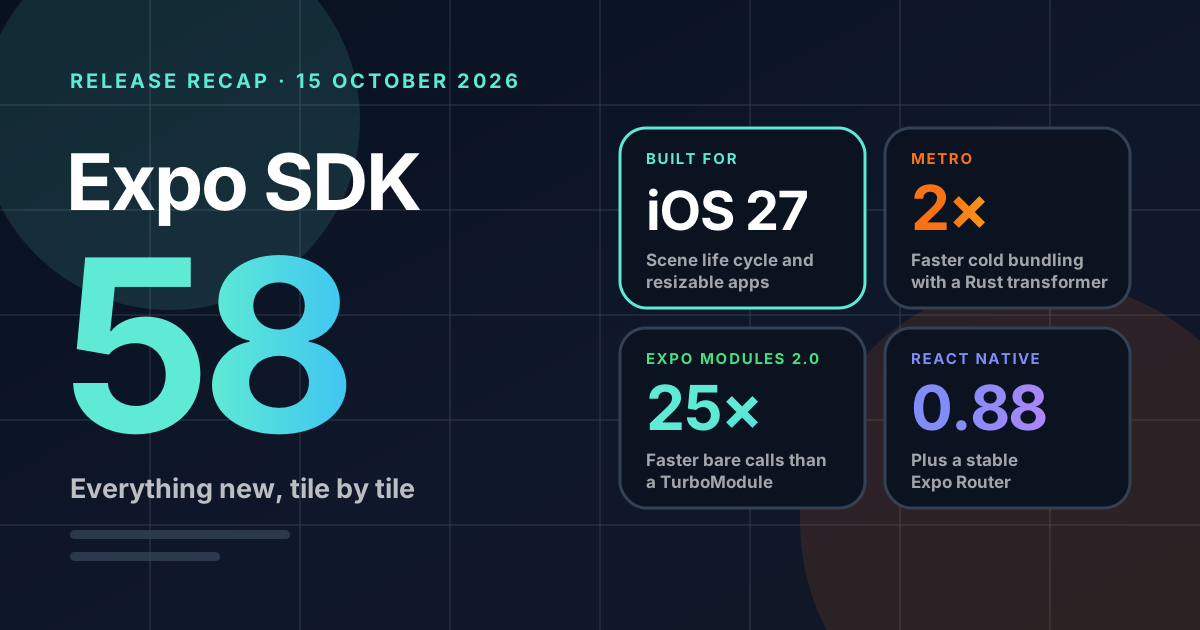
Built for iOS 27, with React Native 0.88, Expo Modules 2.0, a stable Expo Router and Android builds in about half the time. Every feature, benchmark and breaking change, tile by tile.
By Paddy B17 October 2026Approx. 9 min read
Expo shipped SDK 58 on 15 October 2026. It is built against the iOS 27 SDK, it moves React Native from 0.86 to 0.88, and it takes Expo Router's data loaders, server rendering, middleware and native tabs out of experimental. Native modules also get faster to call and quicker to compile, and an experimental Rust transformer roughly halves cold bundle times.
Expo's release notes are long and thorough. Below is the same release laid out as a grid: the headline features first, then the smaller package updates, then what to check before you upgrade. Every number comes from Expo's announcement, and the benchmarks are Expo's own.
iOS 27The iOS SDK it's built for
0.88React Native, up from 0.86
2×Faster cold bundling, experimental
25×Faster than a TurboModule for a bare call on Android
Get the highlights.
iOS 27
Ready for iOS 27 from day one.
iOS 27 requires the UIKit scene-based life cycle and makes iPhone apps resizable. SDK 58 apps get both. Prebuild now generates SceneDelegate.swift and a scene manifest, and Expo still forwards URLs, Handoff and quick actions to your ExpoAppDelegate subscribers.
requireFullScreen no longer opts out of resizing on iOS 27, so ScreenOrientation.lockAsync may do nothing while the app is resizable.
iPhone Duo
Ready to unfold on launch day.
Expo Router's Stack and NativeTabs use the system's own bars, which iOS moves into a side rail for you. Expo UI adds ArrangementView for layouts around the fold, and the new expo-hinge reports the hinge angle on iOS 27.1+ and Android 11 foldables.
Update react-native-safe-area-context and handle horizontal insets.
Expo Modules 2.0 · Beta
Plain Swift and Kotlin, with much faster calls.
Annotate an ordinary class instead of learning the module DSL. Bindings are generated at build time, so synchronous calls on iOS run 2.5 to 5.6× faster than the DSL on an iPhone 16 Pro.
Every existing module gets cheaper on iOS with no changes too. Long strings pass up to 3.8× faster, and async promises cost less to create and resolve.
Android microbenchmarks against a TurboModule. Lower is better; each pair has its own scale.
Call with no arguments25× faster
Modules 2.0112 nsTurboModule2,837 ns
Pass an array of 20 objects14× faster
Modules 2.010.7 µsTurboModule149.8 µs
Emit an event with an object8.4× faster
Modules 2.0963 nsTurboModule8,080 ns
Experimental · Metro
2×
faster cold bundling.
Noxcturnal is a new module transformer written in Rust on oxc. Turn it on with experiments.noxcturnalTransformWorker.
Babel5.26 sNoxcturnal2.46 s
Cold bundle of Expo's ~5,500-file test app
Android builds
39s
for a clean debug build, down from about 80.
expo-modules-core now ships prebuilt native libraries for all four ABIs, so its C++ no longer compiles on every clean build, CI run and EAS Build.
From source~80 sPrebuilt~39 s
Blank SDK 58 project, Apple M3 Pro
App Intents · Alpha
Let Siri and Apple Intelligence use your app.
expo-app-intents exposes your app's actions and content to Siri, Shortcuts, Spotlight and Apple Intelligence. Declare intents in Swift, then handle them and update their data from JavaScript.
Which task do you want to complete?
Add a profile photo
Connect your calendar
Invite your team
Sketch of the release post's example, an onboarding checklist app answering through Siri.
npx expo-app-intents init
Xcode 27
Device Hub, in your browser.
Expo CLI boots simulators through Xcode 27's Device Hub. The new expo-device-hub plugin streams every simulator and emulator to a browser tab, with CPU, memory and network graphs.
Dark appearance
Liquid Glass
Larger text
Expo UI
Lists that recycle. Navigation that's native.
List, LazyVStack and LazyHStack in SwiftUI, and LazyColumn and LazyRow in Compose, now render only the rows near the screen and reuse them as you scroll.
Every component in the Expo UI docs now has a screenshot beside its API, and hosted React Native views measure and take touches correctly inside sheets and menus.
Expo Router
The big features are now stable.
Data loaders Stable
Server-side rendering Stable
Middleware Stable
Native tabs Stable
Toolbars Stable
A reworked navigation core makes state deterministic and drops most of the forked React Navigation API. New: React transitions, activityEnabled, extendRouter and screen error boundaries.
Web projects now default to server output and async routes.
Experimental · @expo/agent-cli
A CLI built for coding agents.
It sits on top of Expo CLI, EAS CLI and expo-doctor, works out when your app needs a development build, and prints the next step after every command.
$ npx @expo/agent-cli@latest agents:setup
status
Checks Expo Go compatibility without starting the app
dev
Starts the app, building it only when needed
smoke
Runs dev, takes a screenshot, then stops
skills:sync
Sets up agent skills from node_modules
Expo CLI also adds npx expo command:ps and command:events, machine-readable views of running Expo processes.
expo-widgets
Widgets come to Android.
Android widgets run their own bundle on a dedicated Hermes runtime, with interactions and Material Colors. iOS Live Activities gain staleDate.
Expo CLI
A faster, steadier tunnel.
expo start --tunnel now runs on @expo/ws-tunnel, with no ngrok dependency. It connects faster and holds the connection more reliably.
Sign in with expo login first. Pass --tunnel ngrok for the old tunnel.
React Native
0.88
SDK 58 jumps from 0.86, so you get everything in 0.87 too.
Swift Package Manager tooling with npx react-native spm
fontVariationSettings on Text for variable font axes
ArrayBuffer values in TurboModules on Android and iOS
DevTools performance screenshots and WebSocket inspection
The Strict TypeScript API, on by default
@expo/fingerprint
Fewer needless native rebuilds.
The new default, the balanced preset, hashes native modules by package name and version instead of their files.
Bump version in app.jsonSame hash
Edit a file in node_modulesSame hash
Upgrade a native moduleNew hash
EAS CLI
PostHog in one command.
EAS CLI creates or links the project, installs the SDK, and tags every event with its EAS update, build and channel. Works with any SDK version.
eas integrations:posthog:connect
iOS builds
Groundwork for Swift Package Manager.
Expo's iOS sources now compile as separate SwiftPM targets, and an autolinking plugin for npx react-native spm is in preview.
CocoaPods stays the default, and precompiled Expo modules keep working there.
Dev builds and Expo Go
One launch URL for both.
Query parameters starting with __expo_ are launcher commands. They're stripped before your app sees the URL, so they never clash with your deep links.
Set EXPO_NO_DEV_MENU=1 to hide the dev menu and Tools button in CI and agent runs.
Dev servers
Connects through proxies and tunnels.
Manifests use relative URLs, so development builds can reach a server behind a proxy or on another machine.
Prebuild writes the Metro port to RCTMetroPort in Info.plist, and non-interactive runs move to the next free port.
And so much more.
Document scanning
expo-camera
CameraView.scanDocumentAsync scans multi-page documents on Android and iOS.
File hashes and previews
expo-file-system
File.digest() returns MD5 to SHA-512 hashes, and File.preview() opens native previews.
Lock screen playback
expo-audio
Lock screen controls with playlists, plus WAV and PCM file recording.
Recolourable SVGs
expo-image
svgVariables fills an SVG's CSS custom properties, and transition.skipOnCacheHit skips fades for cached images.
Variable fonts
expo-font
One font file can supply several weights and styles on Android, iOS and web.
Notifications that share
expo-notifications
Works alongside other push libraries on iOS, groups by threadIdentifier, and adds alarm-clock delivery on Android.
A new location API
expo-location/next
A preview with watchers, background updates and temporary full accuracy on iOS. iOS geofencing no longer needs the background mode.
SQLite controls
expo-sqlite
interruptSync() cancels running work, and configureWeb() loads your own wa-sqlite build for full-text search on web.
Confirmed secure reads
expo-secure-store
requireConfirmation asks the user to authenticate on Android before a read or write.
Keep more updates
expo-updates
updates.maxUpdatesToKeep sets how many updates stay on the device, useful if you switch channels often.
Standards-grade URLs
expo
URL and URLSearchParams were rewritten with IDNA/TR-46 support, and TextDecoder was rewritten for speed.
More control in Observe
expo-observe
errorHandlingEnabled turns off automatic JS error capture, and Observe.clientId links its data to other tools.
Clearer stack traces
@expo/metro-config · @expo/log-box
Errors inside libraries show where they were thrown, and changing an EXPO_PUBLIC_ value now clears the cached transform.
Sturdier Android tooling
@expo/cli
AVD and adb handling was rewritten, and a failed run:ios now prints the Xcode build log path.
Cleaner deep links
expo-linking
unwrapDevLaunchURL() resolves launch URLs, and Linking.parse() no longer decodes values twice.
Liquid Glass on iOS 27
expo-glass-effect
isLiquidGlassAvailable reports true in apps built with the iOS 27 SDK.
Before you upgrade.
Node.js
22.13+, 24.3+ or 26+
Odd-numbered releases such as 23 and 25 aren't supported.
Android Gradle Plugin
AGP 9 ready
Expo modules tooling is compatible. R8 is now on by default for release builds.
Jetpack Compose
1.12.1
Compose UI and Foundation, with Material 3 1.5.0-beta01. No breaking changes.
macOS
Not yet
Support returns once react-native-macos reaches React Native 0.86.
Breaking changes
What might need a fix.
react-native 0.87
The Strict TypeScript API is the default, so deep imports from react-native/Libraries/* are type errors. The opt-out goes after 0.89.
react-native
InteractionManager, the Touchable root export, NativeMethods types, Modal's animated prop and three StatusBar props are gone.
iOS scene life cycle
Prebuild generates SceneDelegate.swift, and the scene delegate now creates the window. Custom app delegate code needs the migration guide.
NODE_ENV
Expo CLI sets it from the command, so NODE_ENV=test npx expo start now loads .env.development.
Android template
R8 is on for release builds. Libraries that rely on reflection may need ProGuard keep rules.
expo-router
Deterministic navigation core, server output by default, and @expo/ui and expo-symbols become optional peer dependencies.
expo-file-system
File.write() is now async. Use File.writeSync() for the old behaviour.
expo-sqlite
libSQL support is removed, including syncLibSQL() and libSQLOptions.
expo-notifications
Foreground notifications now show by default unless your handler says otherwise.
@expo/ui
<Host> top-aligns on iOS, stacks use system spacing (pass spacing={0} for the old layout), and RNHostView loses style on Android.
expo-localization · expo-media-library
iOS no longer forces RTL from the device locale, and Asset.getUri() resolves the current version of a video.
@expo/cli · @expo/fingerprint
expo login opens the browser, expo serve refuses dev exports with server code, and fingerprints default to the balanced preset.
Deprecations
Still works, but switch soon.
Package
Deprecated
Use instead
expo-file-system
File.md5
File.digest()
expo-modules-core
NativeArrayBuffer
ArrayBuffer
expo-observe
AppMetrics
Observe
expo-router
withLayoutContext
integrateWithRouter
expo-sqlite
useLibSQL config property
Remove it; it has no effect
@expo/ui (iOS)
backgroundOverlay
background
@expo/ui (iOS)
color on border and strokeBorder
content
@expo/ui (iOS)
Elements as List.ForEach children
data, keyExtractor and a children function
@expo/ui (Android)
maxItemWidth on HorizontalCenteredHeroCarousel
preferredItemWidth
@expo/ui (Android)
TimePicker colour names containing Unselected
The Material 3 names, such as clockDialContentColor
Upgrade in six steps.
Upgrade your dependencies
npx expo install expo@^58.0.0 --fix
Check for known issues
npx expo-doctor@latest
Read the breaking changes
Go through the deprecations and breaking changes above, then the full changelog for anything else your app uses.
With Continuous Native Generation, delete the android and ios folders made for SDK 57. Without it, run npx pod-install and apply the native upgrade helper.
Make a new development build
If you use expo-dev-client, build again after upgrading.
Expo Go for SDK 58 arrives in a few weeks. Until it reaches the App Store and Google Play, npx create-expo-app still makes SDK 57 projects, and the new Expo Go will only support SDK 58. To start an SDK 58 project now, use the template with a development build: